LinkedIn's native scheduler is underused—most creators don't know it exists or how to maximize it. Yet strategic scheduling boosts engagement 2-3x compared to manual posting. This comprehensive guide covers everything: native scheduler setup, optimal timing, batching strategy, tool comparisons, and how to analyze performance.
How to Use LinkedIn's Native Scheduler
LinkedIn's native scheduling feature is free for all users. It works for text posts and image posts (but not carousels). Here's the step-by-step process:
Step-by-Step: Scheduling a Post Natively
- 1. Create your post normally: Click "Start a post" → write your content → add images if desired
- 2. Find the schedule button: Look for the down arrow next to "Post" (bottom-right of the composer)
- 3. Click "Schedule": A calendar picker will appear
- 4. Choose date and time: Select when you want LinkedIn to publish. LinkedIn shows your local timezone. You can schedule up to 3 months in advance
- 5. Confirm: Click "Schedule Post" and your post moves to your drafts/scheduled section
- 6. Verify: Your scheduled posts appear in a separate "Scheduled" tab you can access anytime
LinkedIn will publish the post automatically at the exact time you chose, in your timezone. No action needed on your part.
Accessing Your Scheduled Posts
You can view and edit scheduled posts by: going to your profile → click the menu (three dots) → select "Scheduled posts." From there, you can edit the content (until 24 hours before publishing), reschedule, or delete.
Optimal Timing Strategy: When to Publish
Timing is your highest-leverage decision. A great post published at 2 AM gets buried. The same post published at 9 AM gets 3x the engagement. Here's the data-driven strategy:
Peak Publishing Windows
Highest Engagement Posting Windows:
- Tuesday-Thursday: Peak professional activity days (plan work, check projects). Monday/Friday engagement drops 20-30%
- 8-10 AM: Morning deep work window. Professionals check LinkedIn between starting their day and first meetings
- 3-5 PM: Afternoon break window. Energy dips after lunch, professionals break for browsing
- Avoid 11 AM - 2 PM: Lunch hours and mid-day focus time. Engagement is lowest
- Avoid 6 PM - 8 AM: Post-work (low engagement) and early morning (low volume). Wait until 8+ AM
Important caveat: These are general patterns. Your specific audience may have different habits based on timezone, industry, and role. Use LinkedIn Analytics (free) to identify YOUR audience's peak activity times after 4-8 weeks of posting.
Klyo automates this analysis: the same Content Calendar screen where you manage your scheduled posts also includes a built-in best time to post recommendation, so picking a slot in your linkedin post scheduler and knowing whether it's actually a good slot happen in one place. Once you've published a handful of posts through Klyo, it pulls your real LinkedIn engagement and shows your personal best day and hour, plus a full breakdown by day and time of day, instead of a generic scheduling-tool guess. Before that, it shows a proven starting recommendation so the calendar is never blank.
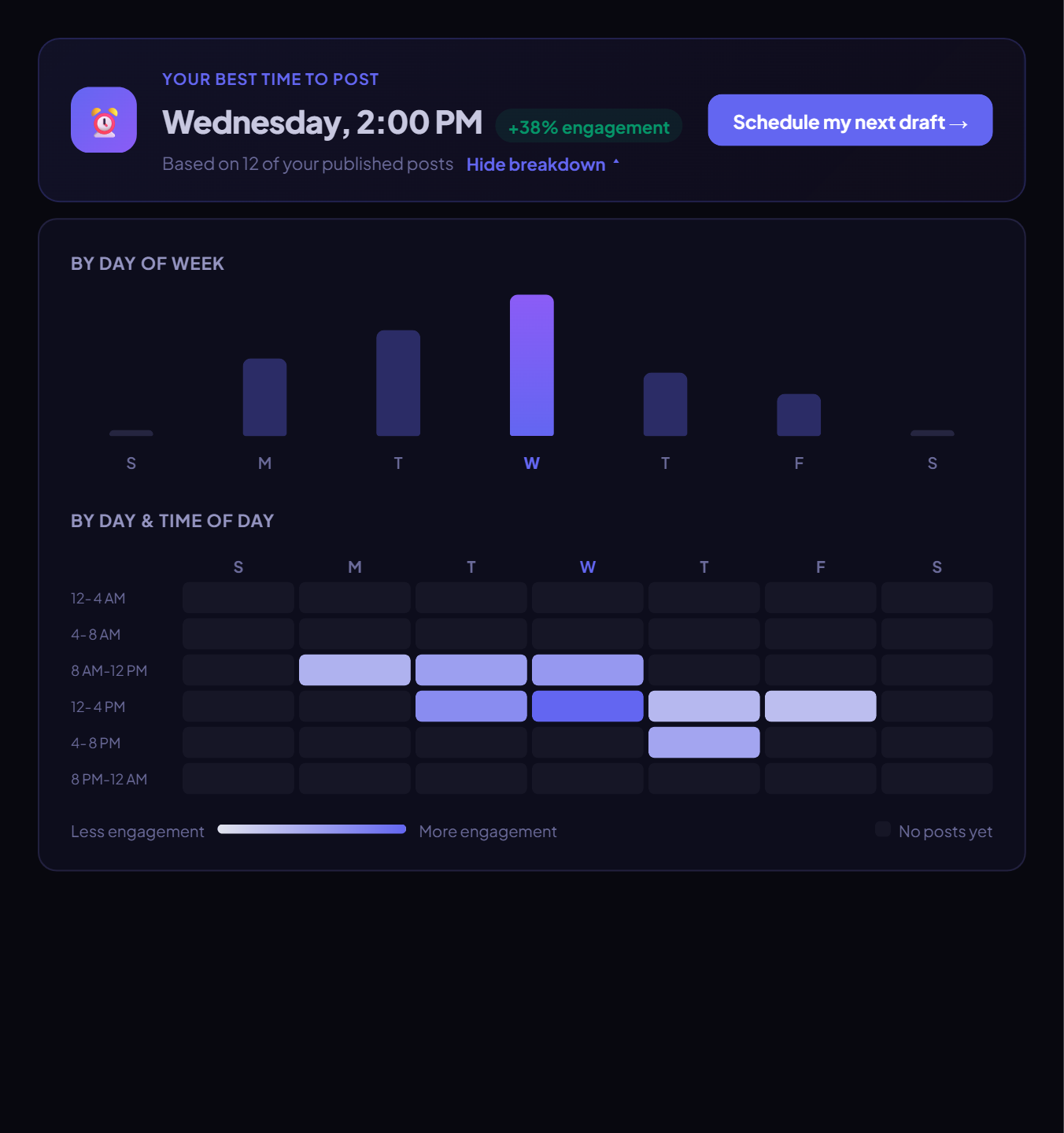
For the full breakdown of how the day-of-week chart and heatmap are calculated, see Best Time to Post on LinkedIn.
Industry-Specific Timing
Peak times vary by industry:
- Tech/Startups: 9-11 AM (early standup/focus time), 5-7 PM (after meetings)
- Finance/Banking: 8-10 AM (pre-market hours), 4-6 PM (market close activity)
- Sales: 9-10 AM and 4-5 PM (breaks between calls)
- Marketing: 10-12 PM (planning/creative time), 3-5 PM (afternoon reviews)
- HR/Recruiting: 9-11 AM (high hiring activity), 1-3 PM (candidate screening)
The pattern: professionals check LinkedIn during transition times (start of day, between activities, end-of-day wind down), not during deep work.
Scheduling Strategy: How to Build Consistency
Consistency is more powerful than frequency. One post per week, every week, beats three posts in one week and silence for two weeks. Here's how to maintain consistency through batching:
The Batching Framework
Step 1: Dedicate 60-90 minutes to content creation (Sunday or Monday afternoon)
- Create 4-8 posts for the week ahead
- Mix content types: insights (30%), stories (30%), how-tos (25%), commentary (15%)
- Write with your authentic voice, not templates
Step 2: Schedule all posts at once
- Schedule across your optimal windows: 1-2 posts Tuesday 9 AM, 1-2 Wednesday 3 PM, 1-2 Thursday 9 AM, etc.
- Spread posts across different windows to maximize reach (not all at 9 AM)
- Aim for 2-3 posts per week (14-21 posts per month)
Step 3: Dedicate 20-30 minutes daily to engagement
- Don't just broadcast. Comment on 3-5 other posts in your niche
- Reply to comments on your scheduled posts immediately
- Build relationships through genuine engagement
Why batching works: You remove daily decision friction, ensure consistency even when busy, and free time for engagement (which is more valuable than posting).
Third-Party Scheduling Tools
When to use tools beyond LinkedIn's native scheduler:
- You want to schedule carousels (native scheduler doesn't support this)
- You want batch scheduling across multiple days at once
- You want optimal time predictions based on analytics
- You manage multiple LinkedIn accounts
- You want advanced analytics and performance tracking
Comparison: LinkedIn Scheduler vs Tools
| Feature | LinkedIn Native | Buffer | Later | Klyo |
|---|---|---|---|---|
| Cost | Free | Free or $15/mo | $25/mo | $29/mo |
| Schedule Text Posts | ✓ | ✓ | ✓ | ✓ |
| Schedule Carousels | ✗ | ✓ | ✓ | ✓ |
| Batch Scheduling | Limited | ✓ | ✓ | ✓ |
| Optimal Time Prediction | ✗ | ✗ | Limited | ✓ |
| Voice Training | ✗ | ✗ | ✗ | ✓ |
| Content Calendar | Basic | ✓ | ✓ | ✓ |
Recommendation by use case:
- Starting out (1-3 posts/week): Use LinkedIn native scheduler—free and sufficient
- Growing (4-6 posts/week): Buffer free tier or Klyo—better batching and analytics
- Serious growth (7+ posts/week or carousels): Klyo or Later—carousel support, optimal timing, team collaboration
- Multi-account management: Buffer or Hootsuite—handle many accounts efficiently
A/B Testing Your Posting Times
After 4-8 weeks of scheduled posting, analyze performance to find YOUR peak times:
How to Run a Time Test
- Week 1-2: Schedule all posts at 9 AM Tuesday-Thursday
- Week 3-4: Schedule all posts at 3 PM Tuesday-Thursday
- Week 5-6: Try Monday 9 AM and Friday 3 PM (test other days)
- Compare metrics: Which time window got highest impressions, engagement rate, clicks?
Key metrics to compare: impressions (reach), engagement rate (likes + comments ÷ impressions), click-through rate (for links). Focus on engagement rate, not just impressions—a post reaching 500 people with 10% engagement beats 2,000 people with 1% engagement.
After your test, lock in your peak window and schedule 80% of posts there. Reserve 20% for experimentation or real-time trending content.
Scheduling Across Time Zones
If your audience spans multiple geographies:
Strategy 1: Single Window (Recommended for focus)
- Identify your primary audience timezone (where 60%+ of your followers are)
- Schedule all posts for that timezone's peak hours
- This concentrates engagement in one window, boosting algorithm favor
- Secondary audience still engages, but weaker
Strategy 2: Multi-Window (For truly global audiences)
- Schedule 2-3 posts per week across different timezones
- Example: Monday 9 AM EST, Tuesday 2 PM GMT, Wednesday 9 AM SGT
- This reaches different time zones but dilutes engagement per post
- Use if you have strong presence in 3+ regions
Pro tip: Most scheduling tools let you set timezone per post, automatically converting to your audience member's local time. This ensures posts appear "fresh" to each region.
Content Types: What Schedules Best
Different content types should be scheduled differently:
Text Posts (Schedule in advance)
Timeless content (frameworks, lessons, tips) should be scheduled weeks ahead. They remain relevant regardless of publish date.
Carousel Posts (Schedule 1-2 weeks out)
Carousels drive high engagement but require native LinkedIn publishing or a third-party tool. Schedule at your peak windows. Carousels published on Tuesday-Thursday get 25% more engagement than Monday/Friday.
Trend Commentary (Post real-time, don't schedule)
If LinkedIn's algorithm changes or an industry story breaks, respond immediately. Don't schedule this—real-time responses get better traction and mark you as an engaged voice.
Story Posts (Schedule 2-3 days ahead)
Personal stories (wins, failures, learning moments) schedule well. Publish them when your audience is most reflective (not rushing at 9 AM). Thursday-Friday 3-5 PM works well for story posts.
Common Scheduling Mistakes (And Fixes)
Mistake 1: Scheduling all posts at the same time → Schedule across different windows (9 AM, 1 PM, 3 PM) to spread reach
Mistake 2: Scheduling too far ahead → Schedule 1-4 weeks out, not months. Keep flexibility for timely content
Mistake 3: Forgetting to engage after posting → Schedule posts but manually reply to comments. Engagement = algorithm boost
Mistake 4: Not tracking performance → Review analytics weekly. Adjust timing based on data after 4 weeks
Mistake 5: Overusing notifications → Notify followers for only 1-2 high-value posts/week. Over-notification causes unfollows
Mistake 6: Treating scheduling as "set and forget" → Scheduled posts still need your attention. You must engage with replies and comments to amplify performance
Measuring Scheduled Post Performance
Use LinkedIn Analytics (free, built-in) to track:
- Impressions: How many people saw the post. Higher impressions = better timing
- Engagement rate: (Likes + comments + shares + clicks) ÷ impressions. Aim for 2-5%
- Click-through rate: For posts with links, % of viewers who clicked. Aim for 1-2%
- Comment sentiment: Are people responding positively? Quality matters more than quantity
After 4 weeks of data, compare performance by time window. Publish a spreadsheet with: (Date, Time, Impressions, Engagement Rate). Identify patterns: "9 AM Tuesday gets 2.1% engagement, 3 PM gets 1.8%." Adjust future scheduling accordingly.
Master Your Scheduling with Klyo
Klyo combines scheduling with AI-powered voice training, a built-in best-time-to-post recommendation, and carousel support. Schedule posts that sound like you, at your best time to post.
Start your 14-day free trial and schedule smarter.
Next Steps: Start Scheduling This Week
- Today: Create 4 posts using the batching framework above
- Today: Schedule them for Tuesday-Thursday, 9-11 AM and 3-5 PM
- Daily (20 min): Engage with 3-5 posts in your niche
- Weekly: Review analytics and note which time slots performed best
- After 4 weeks: Adjust your schedule based on performance data
Scheduling tools: Klyo (AI scheduling + voice training) | Free Post Grader
Related reading: Best Time to Post on LinkedIn 2026 • LinkedIn Content Strategy Framework • Build Your Personal Brand on LinkedIn • Voice Training Guide
Compare: LinkedIn scheduling tools comparison